
Coming soon — Giant Mobile. Same freedom, better deal.
Help · Use your own router

Bring yourown kit.

Got a router you love? Plug it in. We'll hand you the credentials.

We don't lock the line to our kit. If you've already got a router you trust — UniFi, ASUS, MikroTik, Draytek, FRITZ!Box, the Openreach Smart Hub, whatever — bring it. Your PPPoE credentials live inside portal.giant.net.uk: reveal them, paste them in, you're online. The only trade-off is support scope — we'll always troubleshoot the line itself, but settings on third-party kit are best-effort because we don't run the firmware. Most issues end up being the line anyway, and that side is fully ours.

24/7

Self-service PPPoE credentials. Reveal them whenever, paste them wherever.

Inside portal.giant.net.uk → My services → Connection details. No phone call, no ticket, no waiting on us.

Open portal
00What we'd otherwise send

For context — the kit you're replacing.

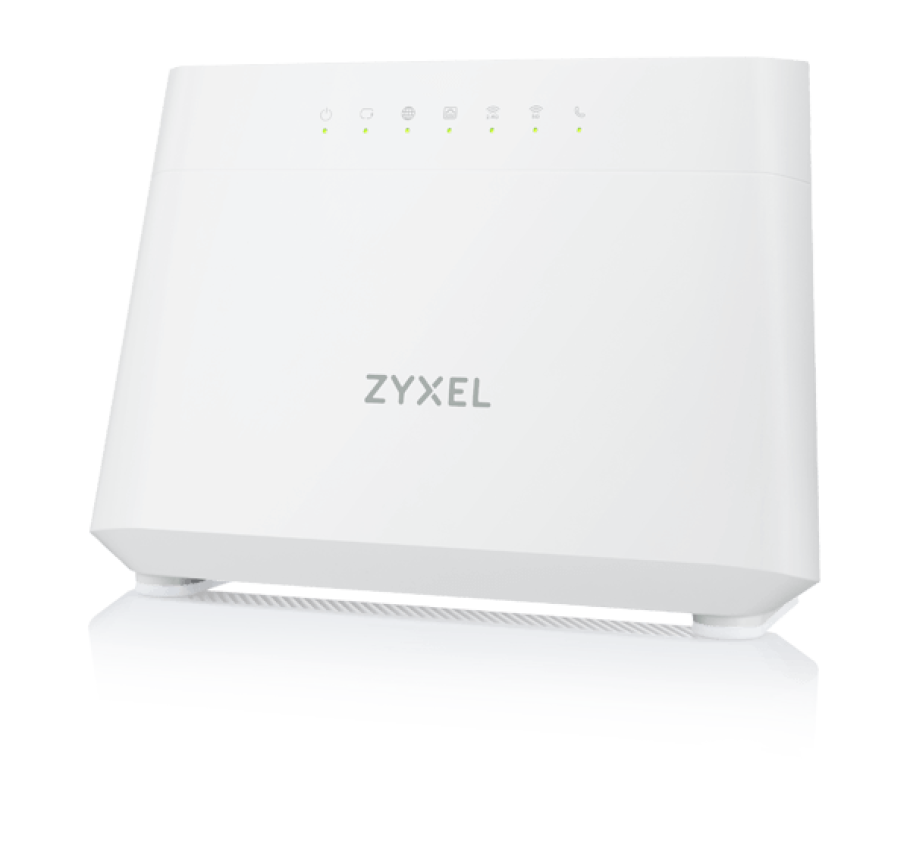
If you'd rather not BYO, here's what we ship by default. The two are matched to line speed: DX3301 for sub-2.5G, EE5301 for 2.5G+ (Netomnia 1.8G, multi-gig FTTP, leased lines). Kit cost is set per tariff and itemised at order.

Zyxel DX3301 Wi-Fi 6 router, white wedge casing with green status LEDs.
Zyxel

Zyxel DX3301

Up to 1 Gbps

Wi-Fi 6 dual-band, FXS port for your home phone, dual-WAN, status LEDs that actually tell you what's happening.

  • Wi-Fi 6 · 802.11ax · dual-band
  • FXS port for home phone (RJ11)
  • Gigabit WAN + 4× gigabit LAN
  • Pre-configured to your line
  • Mesh-ready · Wi-Fi roaming
  • Yours to keep after install

Issued on: Default issue on every full-fibre plan up to 1 Gbps. FTTC + FTTP both supported.
10G capable
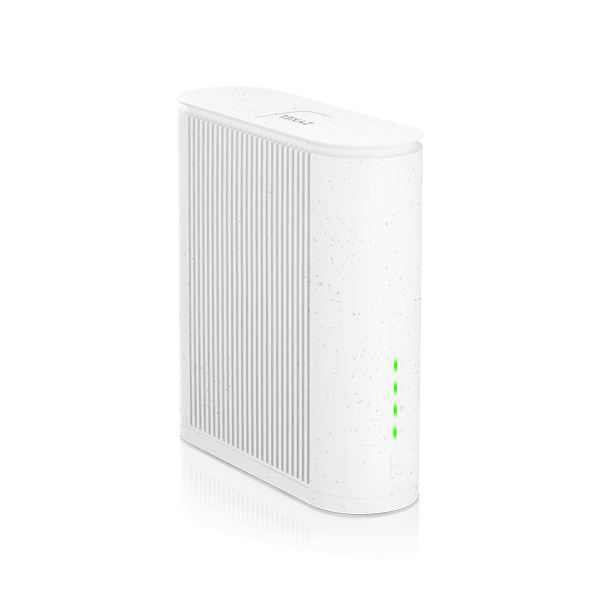
Zyxel EE5301 Wi-Fi 7 router, recycled-material casing with 10G WAN port and green status LEDs.
Zyxel

Zyxel EE5301

2.5 Gbps – 10 Gbps

Wi-Fi 7 tri-band, dedicated 10G WAN port, 2.5G LAN, FXS port for home phone. Built to sustain multi-gig throughput end-to-end.

  • Wi-Fi 7 · 802.11be · tri-band
  • Dedicated 10 Gbps WAN port
  • 2.5G LAN + gigabit LAN ports
  • FXS port for home phone (RJ11)
  • Pre-configured to your line
  • Recycled-plastic eco casing

Issued on: Issued on services above 2.5 Gbps — multi-gig symmetric FTTP, business symmetric, and leased lines.

01Setup

Four settings, that's the lot.

Every modern router exposes these. Names vary brand-to-brand; the values don't.

WAN port — PPPoE

Set the WAN/internet port to PPPoE. Username + password come from the portal (see step below). VLAN tagging is not required on Giant FTTP or Netomnia.

Credentials from the portal

Log into portal.giant.net.uk → My services → your broadband line → Connection details. Tap 'Reveal PPPoE' to copy the username + password. Available 24/7. The credentials are tied to your line and don't change.

MTU + IPv6

MTU 1492 on PPPoE (most routers default to this). IPv6 is dual-stack — enable IPv6 PD (DHCPv6 prefix delegation) if your router supports it for native v6 alongside the v4 PPPoE session.

Plug into the ONT (FTTP) or master socket (FTTC)

FTTP: ethernet from your router's WAN port → ONT LAN1 (the lit port). FTTC: RJ11 lead from the Openreach master socket → your router's DSL/VDSL port — your router has the modem built in, there's no separate Openreach modem in the chain.

02Brand notes

Common kit, where the setting hides.

Quick pointers for the brands we see most often. Not exhaustive — your router's manual will have the rest.

BrandModels
ASUSRT-AX86U / GT-AX series
NetgearNighthawk RAX/RAXE
TP-LinkArcher AX series
UbiquitiUniFi UDM / UDM Pro
MikroTikhAP / RB series
DraytekVigor 2865 / 2927

Brand not listed? PPPoE is a 25-year-old standard — every router with a WAN port supports it. Search "<your brand> PPPoE setup" plus the credentials from the portal and you're ten minutes from online.

03Support scope

What we can help with, what we can't.

The honest version. Bringing your own kit shifts a small amount of responsibility back to you — for most people that's a fair trade.

Always supported

The line itself — sync, attenuation, packet loss, throughput, fault diagnostics from our side of the ONT. We'll run line tests and raise faults to Openreach / the network operator regardless of what you've got plugged in.

Best-effort

Settings, firmware, port forwarding, WAN-side configuration on third-party kit. We'll point you at the right values (PPPoE creds, MTU, VLAN-none) but we can't drive every router brand's UI for you. We'll do our best — it's just slower than on Giant-supplied kit.

Out of scope

Wi-Fi tuning, mesh setup, NAS configuration, smart-home pairing, VPN client setup, hardware faults on third-party gear. Useful guides exist for every major brand; ring us anyway and we'll point you at the right one if we know it.

The line itself stays fully ours — speed, sync, packet loss, fault investigation. None of that depends on your router. If you ever change your mind and want a Giant-supplied router, ring us; there's a one-off charge for the kit and we'll pre-provision it before dispatch.

0

Lock-in to our hardware. Your router, your call. Your line, our problem.

Free choice of router. PPPoE creds in the portal. Line diagnostics from our side regardless of what you've got plugged in.

Troubleshoot first
04FAQ

Real questions, honest answers.

Inside portal.giant.net.uk → My services → tap your broadband line → Connection details → 'Reveal PPPoE'. Username and password are shown in copy-able fields. They're available 24/7 and don't expire. The credentials are tied to your line and stay the same for the life of the service — there's no rotation, so once you've pasted them into your router, you're set. If you can't get into the portal, ring us on 0330 043 0056 — we'll verify your account and walk you through retrieving them.

Your router. Our line.

Reveal your PPPoE credentials in the portal, paste them into your router, you're online. We'll handle the line.

No vendor lock-in · Self-service creds · Line stays supported