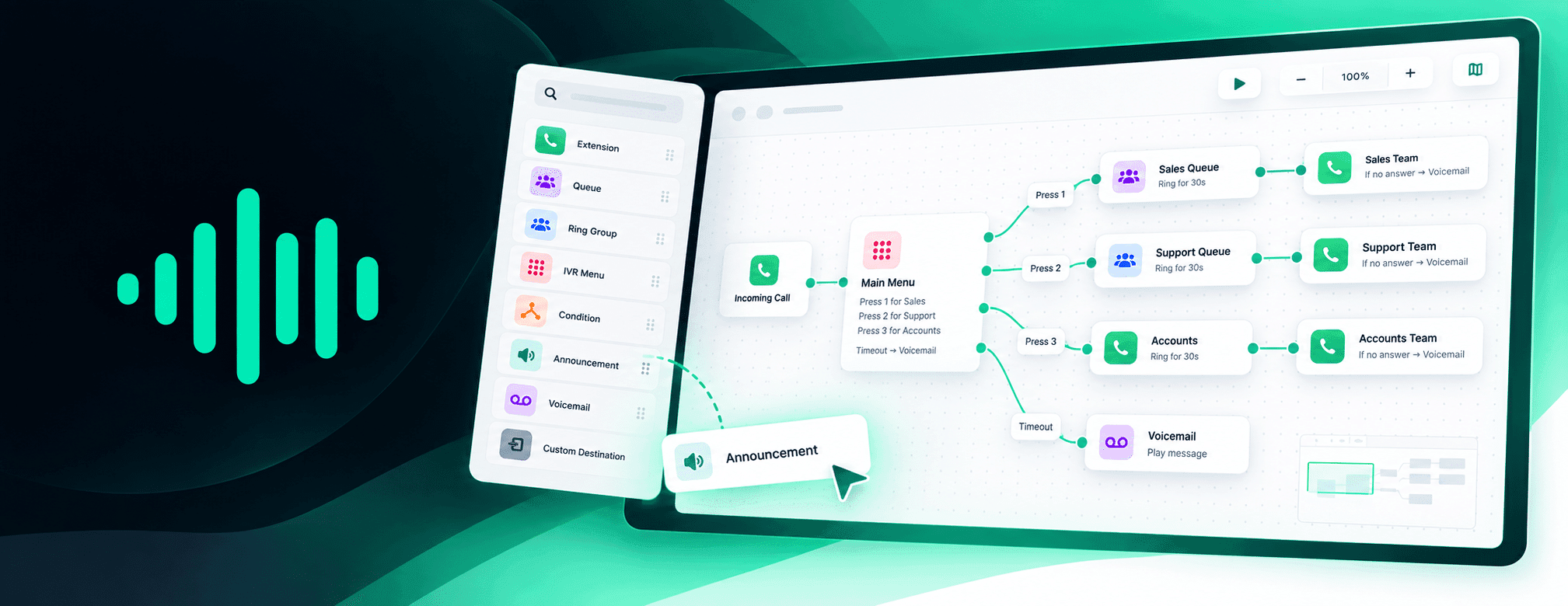
VoiceCloud’s new Call Flow Builder turns your phone system into an interactive map — letting you build, explore, simulate and troubleshoot exactly what happens when somebody calls.
Business phone systems rarely start complicated.
A number rings a few phones. Then you add an opening message. A menu. Sales and support queues. Opening hours. Voicemail. Overflow destinations. Different behaviour when somebody is busy, doesn’t answer or presses the wrong key.
Before long, answering a very simple question becomes surprisingly difficult:
“What actually happens when somebody calls us?”
We wanted VoiceCloud to be able to answer that.
So we’ve rebuilt the way VoiceCloud understands call routing and created something much bigger than the routing screen it replaces.
Introducing Call Flow Builder, now in beta.
Your entire phone system, drawn in front of you
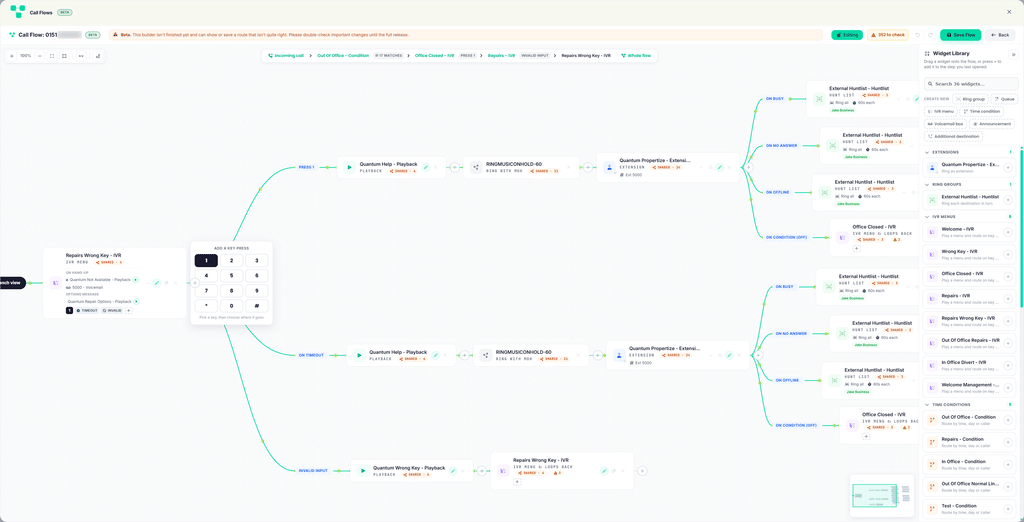
Open a number in Call Flow Builder and VoiceCloud maps its routing from beginning to end.
Not a simplified summary. Not just the next destination.
The whole tree.
An incoming call might enter an opening-hours condition, play an announcement, reach a menu, split into several departments, enter a queue and eventually overflow to voicemail.
VoiceCloud draws every one of those steps and the routes between them.
Busy routes. No-answer routes. Timeouts. Incorrect menu keys. Queue exits. Condition outcomes.
If the telephone system knows about an exit, the builder can show it.
And if a branch simply stops?
VoiceCloud shows that too.
Branches which go nowhere terminate visibly on the canvas rather than quietly disappearing.
Drag. Drop. Done.
Call Flow Builder isn’t just a diagram.
Switch into editing mode and the canvas becomes your phone-system builder.
A searchable library contains the extensions, queues, menus, ring groups, conditions, announcements, voicemail boxes and other destinations available to your account.
Drag one onto your flow, or press + exactly where you want the next step.
Need something that doesn’t exist yet?
Create it without leaving the builder.
New extensions, queues, menus, ring groups, conditions, media and custom destinations can be created from an embedded drawer and dropped straight into the flow.
You can rearrange branches, remove steps and build out routing visually, with full undo and redo support.
It turns what used to be a collection of configuration screens into something much closer to drawing how you want your business to answer the phone.
Walk a call before your customers do
This might be our favourite part.
A diagram tells you where calls can go.
Walk a Call tells you what a caller actually experiences.
Start at the beginning and VoiceCloud moves through the flow one step at a time.
When the caller reaches a decision, the builder gives you the same choices.
At a menu, choose the key they press.
At a condition, follow either outcome.
At a queue with an exit option, choose whether they take it.
The route animates across the canvas as you go.
So instead of trying to mentally decode a complicated configuration, you can ask:
What happens if someone calls, presses 2, nobody answers and the call times out?
And then walk that exact journey.
It’s useful while building a new phone system.
It’s even more useful when somebody says:
“Customers are telling us they can’t get through to Accounts.”
VoiceCloud can now find broken call routes
We didn’t want the builder to wait for somebody to notice a problem.
So Call Flow Builder analyses the routing it draws.
The first beta can automatically detect five types of potential fault, including:
- branches with no destination;
- menus with no timeout route;
- steps that can never be reached because the call has already ended;
- announcements that play and then leave the caller nowhere to go; and
- routing loops that return a caller to an earlier point.
Findings are highlighted directly on the canvas and counted against each flow.
But finding something suspicious is only half the job.
Meet the Flow Analyser
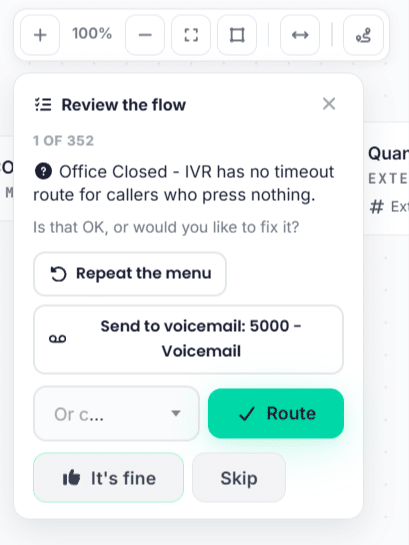
Open the analyser and VoiceCloud walks through its findings one by one.
If the routing is intentional, accept the finding and VoiceCloud remembers your decision.
If it isn’t, the analyser can suggest a fix.
And these aren’t generic suggestions.
Suggestions are built using destinations that actually exist in your phone system.
VoiceCloud might suggest sending the caller to a particular voicemail box, repeating an existing menu, trying another group or removing a step that can never be reached.
The goal isn’t simply to tell you that something looks wrong.
It’s to help you understand why and what you could do about it.
See what’s happening right now
A call flow shouldn’t only describe configuration.
Some of the things it contains have a live state.
So VoiceCloud quietly enriches the canvas in the background with information including extension presence and unread voicemail counts, refreshed every minute.
That means an extension card can tell you whether the phone at the other end is actually online.
Announcements can also be played directly from the canvas.
Menus show their keypad, welcome message and options without making you dig through another configuration page.
The result is a map that’s considerably more useful than a static flowchart.
Shared means shared
There was another problem we wanted to avoid.
Phone systems contain shared objects.
The same Sales Queue might be used by several numbers. Change the queue and every route using it could be affected.
Some visual builders make that relationship difficult to see.
VoiceCloud doesn’t pretend those are separate objects.
Shared elements are clearly identified, including how many other routes use them.
Drop an existing element into a flow and its existing routing comes with it, because that’s how the underlying phone system actually works.
Want this particular flow to behave differently?
Make a copy.
VoiceCloud can clone the element, its members and its exits so the new version can diverge without changing the original.
We’ve also added usage information across nine of VoiceCloud’s ordinary configuration lists, making it much easier to see how important something is before changing it.
Designed to be explored safely
Showing somebody their entire phone system is useful.
Giving them an enormous canvas where an accidental mouse movement can reroute the company’s main number is somewhat less useful.
So Call Flow Builder opens locked by default.
You have to deliberately enter editing mode before the routing can be changed.
Once you do, VoiceCloud also protects unsaved changes. Try to close the builder, go back or leave the page and you’ll be warned first.
Deletion has become safer too.
If an element is still being used somewhere else, VoiceCloud refuses to remove it and tells you which routes depend on it.
That protection now applies across nine different object types.
Built for the ridiculous flows too
Some phone systems are small.
Some very much aren’t.
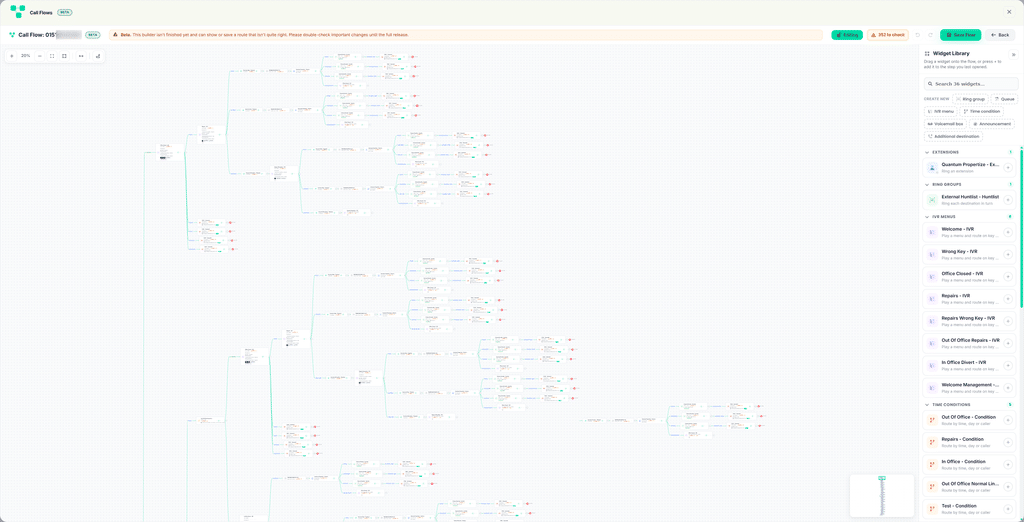
Call Flow Builder uses a memoised resolver and paints cards onto the canvas in chunks, keeping the browser responsive while large routing trees are expanded.
Repeated elements are deliberately drawn wherever they occur so you don’t have to click around the canvas simply to understand the route.
VoiceCloud will draw up to 1,500 cards before later repeated occurrences begin collapsing into expandable markers.
There are zoom controls, fit-to-screen, box selection, panning, a minimap and breadcrumb navigation for concentrating on an individual branch.
Flows can also switch between horizontal and vertical layouts.
Because apparently somebody, somewhere, really does need a 1,500-card phone system.
We’d still quite like to see it.
The rewrite underneath the canvas
Call Flow Builder required more than a new interface.
It changed how VoiceCloud reads routing from the telephone platform itself.
The old implementation could request menu destinations individually. On sufficiently complicated customer configurations, that meant a large number of requests and flows could time out before they had even finished loading.
The new resolver reads the switch’s own destination link data instead.
VoiceCloud now understands 27 different element exits, preserving them as ordered destination stacks rather than flattening them into a single route.
That matters.
It means the picture on the screen is being built from the same relationships the telephone platform uses when deciding where to send the call.
And rebuilding that underlying model uncovered improvements elsewhere in VoiceCloud too.
The builder made the rest of VoiceCloud better
Building Call Flow Builder exposed places where our traditional configuration screens could give customers more context.
So we fixed those as part of the project.
Used-by counts have been added across nine lists. Destination pickers can create objects inline. Ring-group members can be reordered with presence information visible. Audio can be previewed from pickers.
Menus have gained a proper keypad interface.
Numbers now expose their unconditional divert directly, including where the divert leads, while preventing it from being enabled without a destination.
Even some of the language has changed.
Instead of asking customers to understand internal flags, condition branches now simply read:
If it matches
and
Otherwise.
Small changes, but all part of the same objective:
VoiceCloud should explain the phone system in the language of the person using it.
90 builder functions. 27 exits. Five fault types. One canvas.
Call Flow Builder is one of the largest changes we’ve made to the VoiceCloud portal.
The initial release includes:
90 builder functions powering the experience.
27 element exits understood and exposed.
5 automatically detected fault types.
And support for drawing flows containing as many as 1,500 cards before repeated elements begin collapsing.
But the numbers aren’t really the point.
The important change is much simpler.
Previously, configuring a phone system meant knowing how all of its individual pieces fitted together.
Now VoiceCloud can show you.
And when something doesn’t fit together properly, it can start helping you find out why.
Beta starts here
Call Flow Builder is launching as a beta because phone systems are wonderfully good at containing configurations nobody thought anybody would ever create.
Very large flows can still take a moment to paint. A handful of configuration options are still being brought into the new experience, and accepted analyser findings are currently remembered by the browser rather than across an entire account.
That’s exactly why we’re putting the builder into customers’ hands.
We want to find the strange flows.
The ten-year-old menu nobody remembers creating. The destination shared by seven different numbers. The announcement that somehow routes back to itself. The enormous configuration that makes our test accounts look sensible.
And we’ll keep improving the builder around what we find.
Build it. See it. Walk it. Fix it.
Call Flow Builder Beta is the next step in making VoiceCloud a phone system you don’t need to be a telecoms engineer to understand.